
Why does my new mailbox start with a low send budget?
Learn why new or quiet mailboxes start slowly and increase through consistent sending.
2 min read
ColdMerge gives a newly connected mailbox a low starting budget. The age limit rises automatically, but another limit can keep the actual budget lower.
For the exact schedule and every limit, see How much can each mailbox send?.
Why a new mailbox starts slowly
Section titled “Why a new mailbox starts slowly”Receiving services watch changes in sending behaviour. A mailbox that suddenly jumps from a few messages to hundreds can resemble a compromised account or automated spam.
Ramp-up makes the increase gradual. It is automatic and needs no separate schedule.
Why age is not the only limit
Section titled “Why age is not the only limit”The mailbox-age limit rises even if the mailbox sends nothing. ColdMerge also uses recent volume, based on completed 24-hour periods from the previous seven days. This prevents an old but inactive mailbox from jumping straight to a high volume.
The current send budget is the lowest applicable limit. The mailbox row names which limit is currently setting it.
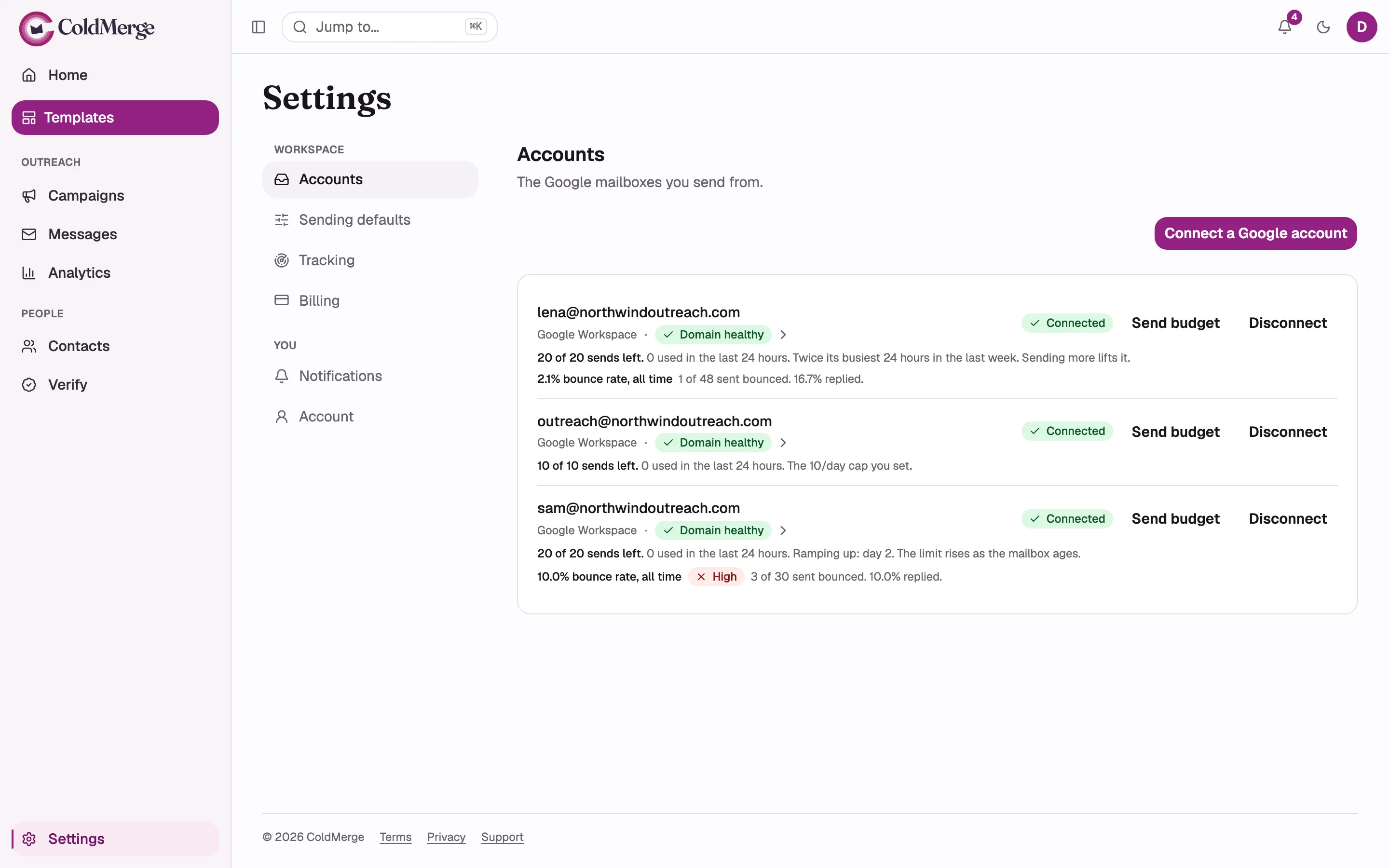
- This mailbox's recent volume sets its current budget.
- A daily cap can set a lower budget.
- A new mailbox can be limited by ramp-up.
Migrating an active mailbox
Section titled “Migrating an active mailbox”An Owner or Admin can open Send budget and set Volume this mailbox already sends. Use the real daily volume from the previous sending tool.
This can raise the mailbox-age limit. It does not raise the recent-volume limit or Google’s provider ceiling.
Why the budget does not reset at midnight
Section titled “Why the budget does not reset at midnight”Most mailbox limits use a rolling window. Capacity returns gradually as individual sends leave that window.
This prevents a mailbox from using one full allowance just before midnight and another just after it. Preview messages use the same rolling budget because they are real messages from the mailbox.
Trial limits
Section titled “Trial limits”During a trial, organization-wide allowance and daily limits also apply. See How much can each mailbox send? for the current figures.
Adding a card does not end the trial. These limits lift when the trial ends or when you select Start paying now.
When the mailbox has no sends left
Section titled “When the mailbox has no sends left”The campaign keeps its queue and continues as capacity returns. What helps depends on the limit named on the mailbox row:
- wait for the rolling window or age step;
- raise Daily send cap if your own cap is lower;
- keep sending consistently to build recent volume;
- connect another mailbox to spread new conversations;
- subscribe if a trial allowance is exhausted.
The provider ceiling cannot be raised in ColdMerge.